
 Nyuchi
Education
··5 min readFor schools: one licence for your whole domain
For school leaders and IT: how the Toddle Enhancement Extension's organisation licence covers your email domain, how to roll it out with the Google Admin console, and what to know about privacy and support.
If you lead a school or run its IT, you need three things from a tool before it goes near your staff: a simple way to pay for it, a simple way to deploy it, and clear answers about student data. This post covers all three for the Toddle Enhancement Extension.
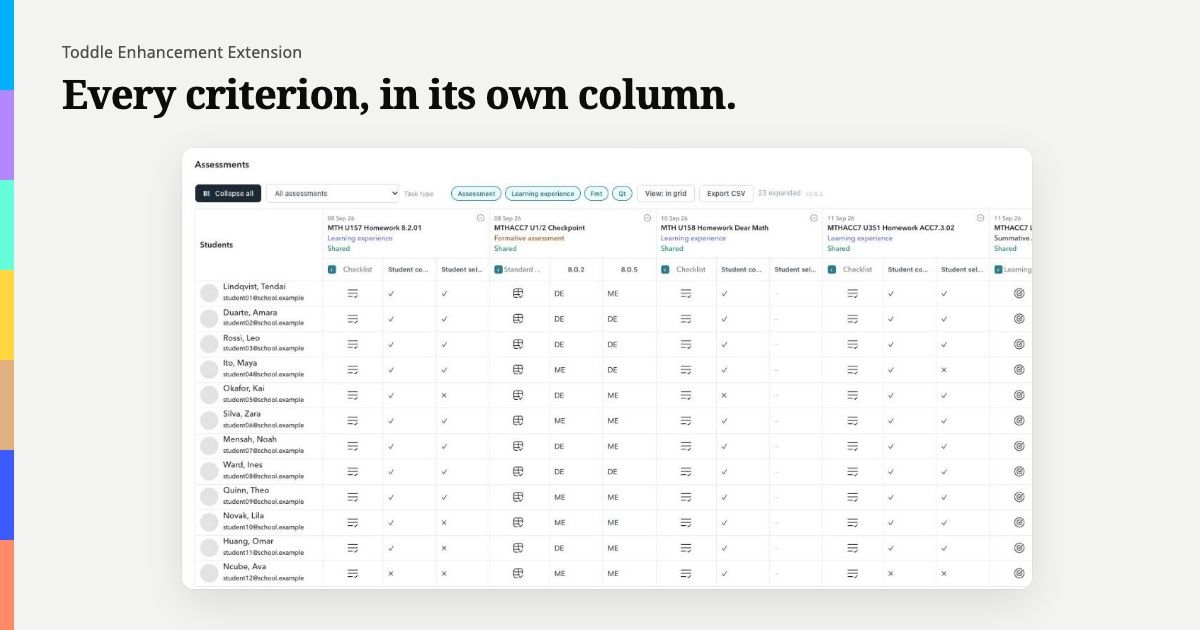
The extension is a Chrome extension, made by Nyuchi Learning, for people who use Toddle. It expands gradebook rubrics into a column per criterion with CSV export, gives every page in Toddle one student sidebar (including where a student is right now, from the timetable), hides student flags before anyone shares their screen, and adds a My classes filter to the home page. If you are new to it, start with our introduction.
One licence for your whole domain
An organisation licence costs US$49.99 a year and gives you one key for your school's email domain. Anyone signed in to Toddle with an address on that domain can use it.
The match is exact. A key for school.example works for teacher@school.example, but not for teacher@staff.school.example or any other domain. If your staff use more than one domain, for example a separate domain for a junior school, several domains can go on one key; email support@nyuchi.com and we will set that up.
The extension checks the domain against the account already signed in to Toddle, reading it from Toddle's own page. The key is checked on the teacher's own machine and never leaves it. If someone signs in with an address outside your domain, the licensed features stay off for them and the licence page explains why.
What the licence turns on: the student sidebar, and the gradebook's per-criterion columns with CSV export.
Free for everyone, licence or not: hiding student flags, and My classes. So staff benefit from the day it is installed, before a key is entered.
A teacher who wants to try the licensed features before the school decides can buy an individual licence for US$5 a year. Either way, we give a full refund within 30 days of purchase, for any reason related to the product.
Rolling it out with the Google Admin console
If your school manages Chrome through Google Workspace, you can put the extension on every teacher's browser without asking anyone to install it.
- In the Google Admin console, go to Devices → Chrome → Apps & extensions → Users & browsers.
- Choose the organisational unit your teachers are in. We suggest not applying it at the root unless you mean students too: the extension is built for staff, and there is no reason for a student account to have it.
- Add the extension from the Chrome Web Store.
- Set the installation policy. Force install makes it appear automatically, and it cannot be removed; that suits a rollout IT owns. Allow install lets teachers opt in; that suits a school where adoption should be a choice.
Chrome keeps managed installs up to date on its own, with nothing for teachers to click. To check a rollout, open chrome://extensions on a managed machine: the extension should be listed as Installed by enterprise policy. Then share the organisation key with staff, who paste it into the welcome page or the extension's toolbar menu.
Privacy and data protection
The extension is a closed loop, and we have tried to make it easy to explain to a data protection lead:
- It runs only on Toddle, and asks Chrome for nothing beyond storage for its settings and access to Toddle's site.
- It reads Toddle through a fixed list of read-only queries, using the session the teacher is already signed in with. It writes nothing back.
- Toddle data never leaves the browser. There is no Nyuchi server holding student data.
- Once a day, a signed check for cancelled keys runs. It sends no key, no email and no cookies.
- An independent security review on 1 October 2026 found eleven issues. All are fixed, each with its own automated test.
We explain all of this in more depth in how the extension keeps student data in the browser. Our privacy policy and security policy have the detail. If your school needs a data processing agreement, we provide one on request at privacy@nyuchi.com.
One thing worth telling staff: the flag switch hides flags, not names, and it works by changing what Toddle draws. It is a courtesy for screen-sharing, not a compliance control, so teachers should check it is on before they share.
Support
For questions about licences, rollout or anything else, email support@nyuchi.com. To report a security problem, use the same address with the subject "Security", and please do not include real student data.
To buy an organisation licence, or to find out more, visit learning.nyuchi.com/toddle-enhancement-extension.
The Toddle Enhancement Extension is made by Nyuchi Learning. Toddle is a trademark of its owner. Nyuchi Learning is not affiliated with, or endorsed by, Toddle.