
 Nyuchi
Education
··5 min readIntroducing the Toddle Enhancement Extension
A Chrome extension for teachers, leaders and admins on Toddle: rubrics in per-criterion columns, one student sidebar everywhere, flags hidden before you share your screen, and a filter for just your classes.
If your school runs on Toddle, you will know the small frictions. A rubric score that hides the criteria behind it. A student flag you would rather not put on the projector. A home page full of classes you do not teach. And the question every teacher is asked several times a day: where is this student right now?
We built the Toddle Enhancement Extension to take those frictions away. It is a Chrome extension, made by Nyuchi Learning, for teachers, school leaders and admins who use Toddle. It adds to the pages you already use, it changes nothing in your school's data, and it works with the account you are already signed in with.
Who it is for
- Teachers who mark with rubrics and want to see how a class did on each criterion, not just overall.
- Pastoral leads, heads of year and coordinators who need a student's timetable, attendance or family contacts quickly.
- School leaders and admins who share their screens in meetings and want to do it without putting sensitive information on display.
Rubrics, one column per criterion
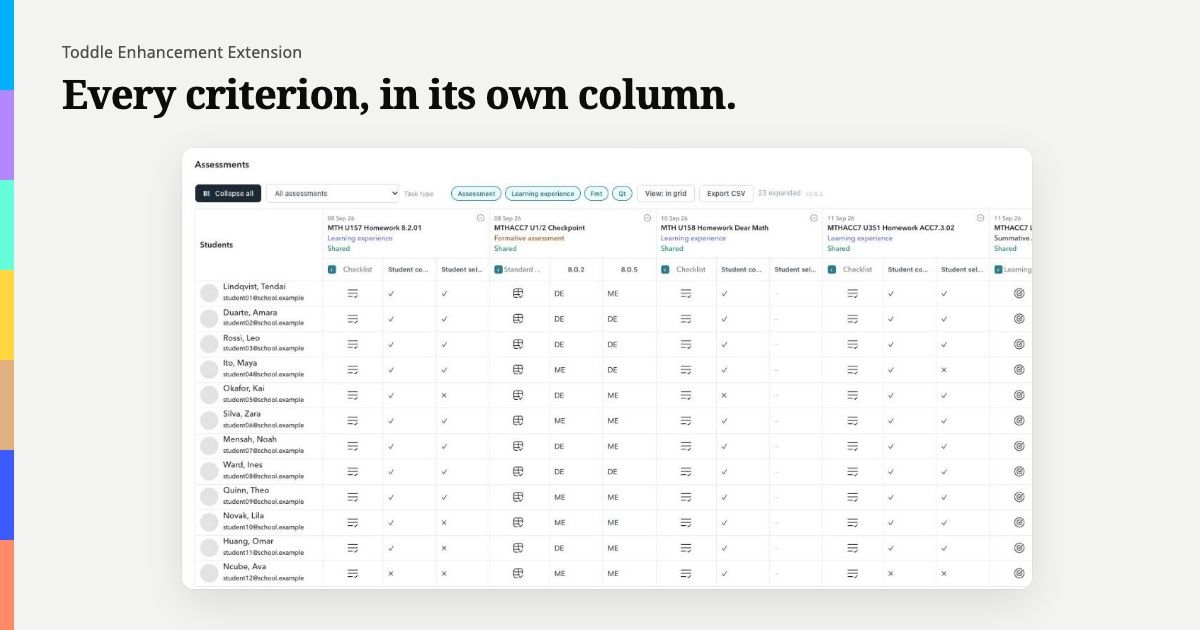
Toddle's gradebook shows each assessment as a single cell. To see how a class did on each criterion of a rubric, you have to open students one at a time.
The extension expands an assessment's rubric, checklist, standards or learning goals into a column per criterion, inside the gradebook itself. Each assessment tool has its own toggle, so you expand only what you need. When the numbers are needed somewhere else, for a moderation meeting, a department review or a report, export the expanded view as a CSV. The file is created in your browser and saved by your browser.
Flags hidden before you share your screen
Projecting a gradebook to a class, or sharing your screen in a staff meeting, can put a student's flag in front of the whole room. So the extension hides student flags by default. One switch in Toddle's header hides them across the gradebook, attendance, the class portfolio, search and the student profile header. Showing them is a deliberate choice.
It hides flags, not names, and it works by changing what Toddle draws, so we still suggest a quick glance to check the switch is on before you share. This feature is free.
My classes
Toddle's home page can list far more courses than you teach. My classes adds a third option to the home page's course filter, beside All courses and My courses: only the classes you teach. It goes by each class's own teachers, so a section you teach in a colleague's course appears, and sections of your course taught by others do not. This is free too.
One student sidebar, everywhere in Toddle
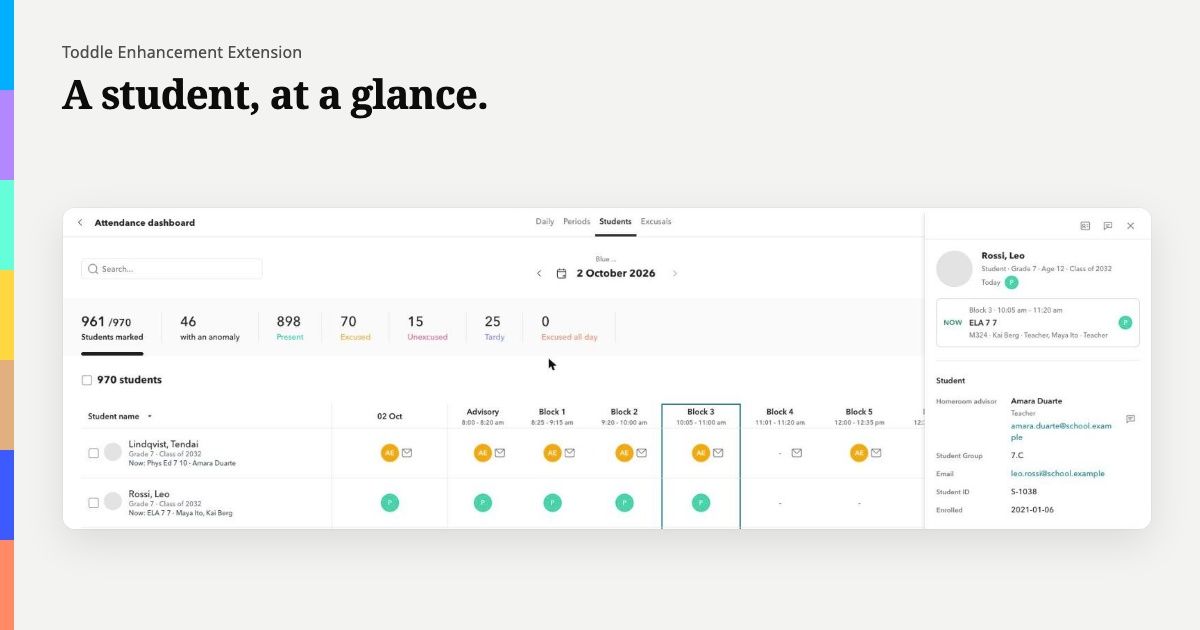
Click a student almost anywhere in Toddle (the dashboard, attendance, the gradebook, homeroom or the class portfolio) and a sidebar opens on the right, the same on every page.
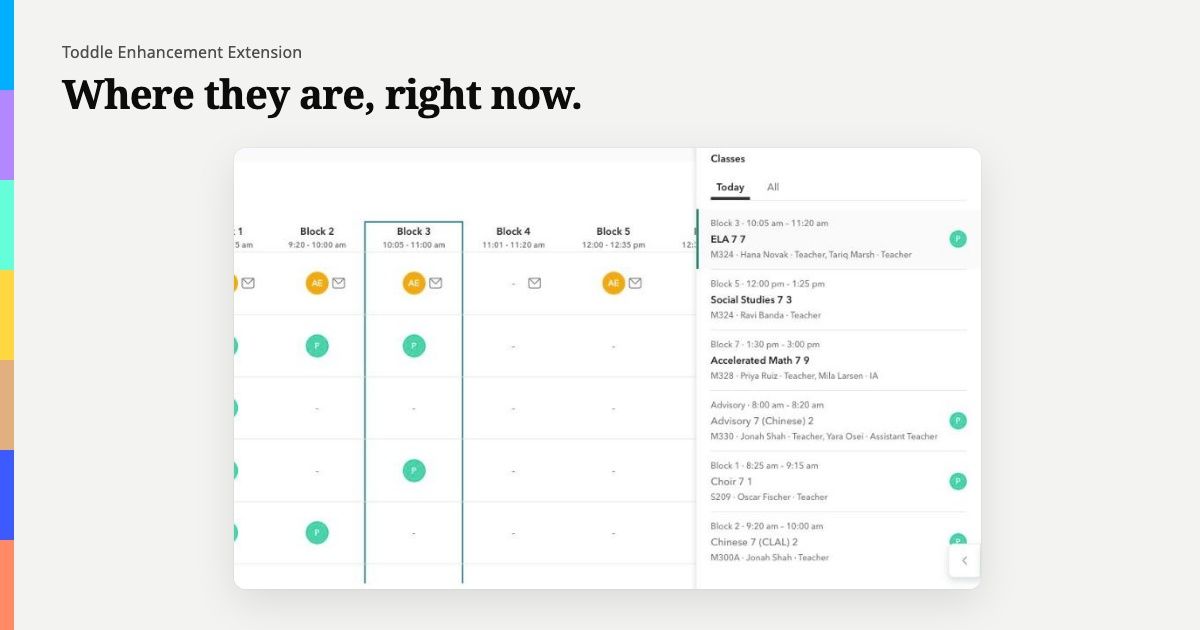
At the top are the student's photo, name, grade, age and Class of year, and the day's attendance code. Beside the photo, the Now card reads today's timetable and tells you where the student should be right now: the class, the room and the teacher, with the attendance code for that period.
Below that are two tabs. Today lists the day's lessons in order, each with its own attendance code, so you can see at a glance whether a student missed one lesson or the whole morning. All lists every class the student is in.
Further down you will find the homeroom advisor, the student's Student Group and their family contacts. Message buttons open Toddle's own chat, so your school's messaging rules still apply. Student flags sit behind an eye button and appear only when you ask.
Click a class and the sidebar shows the class view: the room, the parent course and every teacher on it, each with the Display Title your school has given them.
Installing it
- Go to the extension's page and choose Add to Chrome.
- Open Toddle. A welcome page explains what is free and what needs a licence, and lets you set your defaults.
- The free features work straight away. For the licensed ones, paste your licence key into the welcome page or the extension's toolbar menu.
Chrome keeps the extension up to date on its own. If you are rolling it out across a school, read our guide for schools.
What is free and what needs a licence
Free: hiding student flags, and My classes.
With a licence: the student sidebar, and the gradebook's per-criterion columns with CSV export.
Pricing and refunds
- Individual licence: US$5 a year, for one person.
- Organisation licence: US$49.99 a year, one key for your school's email domain. Several domains can go on one key.
If the extension is not right for you, we give a full refund within 30 days of purchase, for any reason related to the product.
A short word on privacy
The extension is a closed loop. It reads Toddle with a fixed list of read-only queries, using the session you are already signed in with, and it writes nothing back. What it reads stays in your browser. Your licence is checked on your own machine, and the key never leaves it.
We have written up how the extension keeps student data in the browser, including the independent security review it went through. Our privacy policy has the full detail.
Try it
Find out more, and add the extension to Chrome, at learning.nyuchi.com/toddle-enhancement-extension. Questions are welcome at support@nyuchi.com.
The Toddle Enhancement Extension is made by Nyuchi Learning. Toddle is a trademark of its owner. Nyuchi Learning is not affiliated with, or endorsed by, Toddle.